



Screenshot APIs look interchangeable on a feature grid. The differences that matter show up later, on a long product page that never finishes loading, on a marketing site behind bot protection, or on a consent banner that reappears in every capture.
This comparison covers seven providers that take different routes to the same job. One treats capture as the whole product. Another sells browser time and leaves the workflow to your own script. Others fold screenshots into a scraping or extraction platform. The right pick depends less on which option list is longer and more on what makes your pages difficult to capture.
Each section covers what the provider does well, where it constrains you, and which situation it fits. Read the comparison criteria first, then go to the providers that match your workload.
- The Top 7 Website Screenshot APIs at a Glance
- What Actually Separates These Screenshot APIs
- Build Versus Buy: What a Screenshot API Replaces
- What Drives the Cost of a Screenshot API
- Which Screenshot API Should You Choose?
The Top 7 Website Screenshot APIs at a Glance
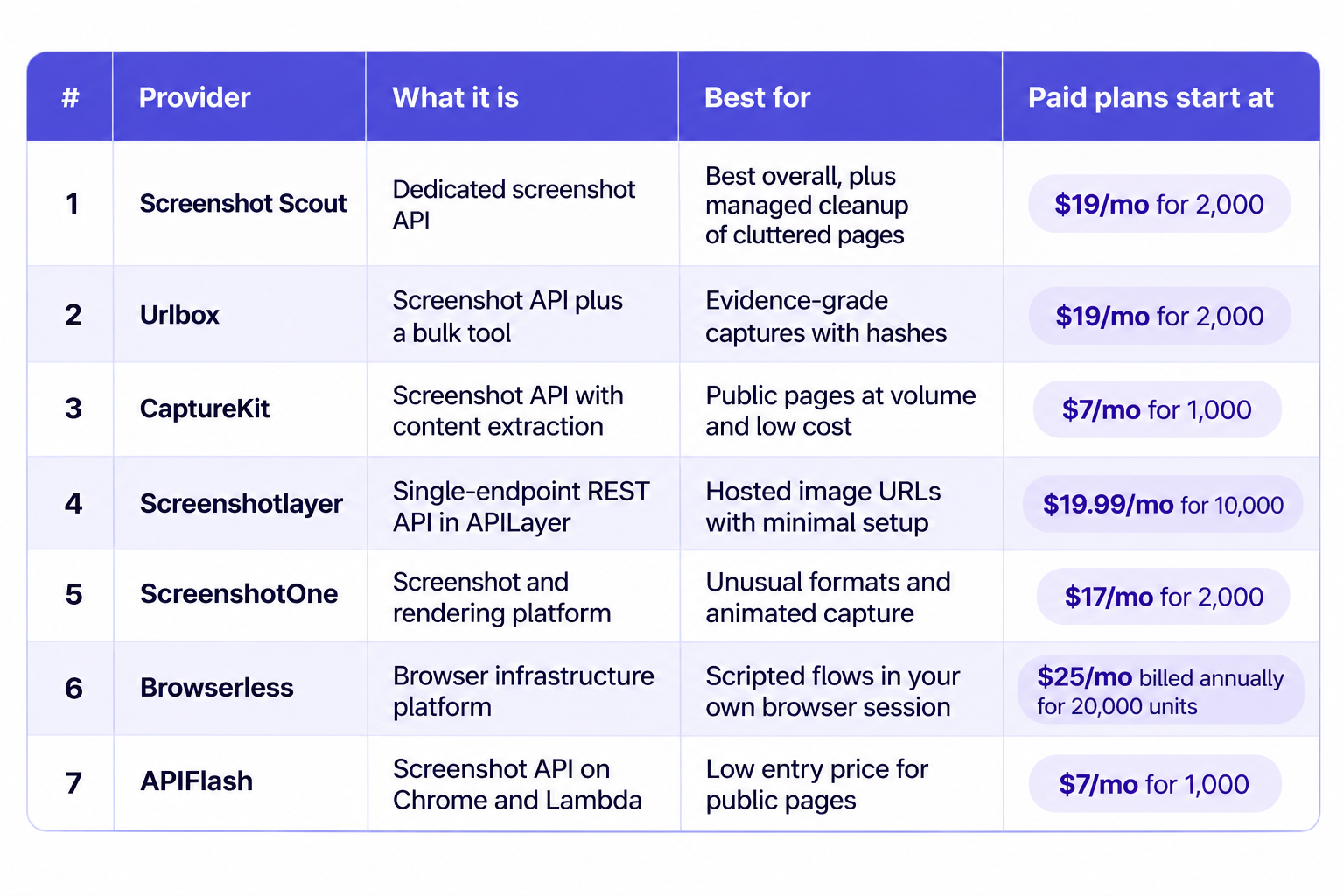
The table compares all seven providers by product type, use case, and listed starting price. The reviews below explain their strengths and limitations.
What Actually Separates These Screenshot APIs
An ordinary viewport capture of a simple marketing page is close to a solved problem. Every provider here can produce that image, and comparing them on it tells you little. The differences appear on harder pages.
Full-page fidelity is the first test. Long pages, sticky headers, and lazy-loaded sections break naive stitching, and a failure usually returns a truncated image rather than an error, so it can pass unnoticed. Look for a provider that scrolls first and lets you tune the scroll.
Second is behavior on pages that resist automation. Consent walls, bot checks, and geo-restrictions are common on the sites buyers most want to capture. A provider that returns a challenge page instead of content is unusable for those targets, whatever the feature list says.
Third is cleanup. Cookie banners, chat widgets, and ad slots aren't part of the page you want to show. Some providers remove them with a request flag, some with CSS you write, and some not at all.
Then come the delivery mechanics: how artifacts are stored, how long URLs live, whether caching is built in, and whether failures and cache hits consume quota. Two APIs with the same headline price can differ by an order of magnitude on real traffic.
Test each shortlisted provider against your own pages, including the awkward ones. A feature list is a starting filter, not a verdict.
Build Versus Buy: What a Screenshot API Replaces
The build side is familiar to anyone who has tried it. A headless browser is CPU-hungry, and a single Chrome instance can take several hundred megabytes of memory. Running many of them means a queue, autoscaling, and a way to recycle processes that leak. Chrome releases security patches on a short cycle, and a version you pinned for rendering consistency goes stale. Lazy loading, infinite scroll, and single-page hydration each need site-specific handling.
The buy side has its own costs. You pay a subscription, accept someone else's rendering configuration, and your ability to modify a page before capture stops where the provider's options stop. When a target site changes in a way the vendor hasn't handled, you wait.
Self-hosting still wins in specific cases: authentication flows an API can't express, strict data-residency rules, or volumes where per-render pricing overtakes the cost of a small browser fleet. Most teams don't land there by default
What Drives the Cost of a Screenshot API
Headline prices are rarely what you pay. Four shapes show up across this list, and they behave differently.
Monthly quotas are the simplest: a fixed allowance, then a hard stop or an overage rate. Credit pools are more flexible, especially when the same credits cover extraction or AI endpoints, but a shared pool hides what a screenshot costs. Browser-time billing charges for the seconds a browser is open, which rewards fast scripts and punishes slow pages. Multiplier billing applies factors for proxies, captchas, and larger output.
Three details move the total more than the plan price: whether failed renders are billed, whether cache hits are billed, and how many concurrent requests your plan allows. On a workload with retries, those three can outweigh the difference between two plans.
Check current pricing, the treatment of failures and cache hits, and what each tier includes before committing. Treat any currently available trial or free allowance as a way to test rather than a reason to assume paid usage is cheap.
1. Screenshot Scout
Screenshot Scout is a dedicated screenshot API for developers. You call one endpoint, pass a URL and options, and get an image back. Cleanup of cookie banners, ads, and chat widgets happens inside the request rather than in your own script, and capture is the whole product.
Strengths
Cleanup is the strongest part. Separate switches strip cookie banners, ads, and chat widgets before the image is captured. Full-page capture scrolls first, with the step size and delay exposed, so lazy images load before the image is stitched. Pages behind bot protection render too, which isn't true of every provider here. Seven official SDKs, a CLI, and an MCP server cover most integration styles, and failed or cached renders don't consume quota.
Limitations
Nothing runs asynchronously: no job queue, no webhook callback, no bulk endpoint, and no scheduled capture, so long batches need your own orchestration. Rate limits top out at 160 requests per minute on the top plan, and the shortest cache lifetime is four hours.
Best Fit
Choose it when you want capture handled as one managed request and you'd rather not maintain browsers, proxy rules, or cleanup selectors. It's the best all-around option on this list, and for most teams it's the one to try first. It suits product teams adding preview images, documentation screenshots, or marketing assets across several languages, and teams that need PDF output alongside images. If your workload is one long batch of thousands of URLs, pair it with your own queue or pick a platform with native bulk support.
2. Urlbox
Urlbox is a dedicated screenshot API that has run since 2012, sold alongside CaptureDeck, a bulk tool that turns a CSV of URLs into screenshots and PDF reports for people who don't want to write code. The API renders images, PDFs, videos, and extracted text from one endpoint, and it targets buyers who need captures they can defend.
Strengths
Options are the strong point. Three render modes cover viewport, CSS selector, and full page, and full-page capture offers two algorithms: a stitching mode tuned for accuracy and a native mode tuned for speed. Evidence features set it apart: a certification setting returns a hash and timestamp, and each render can save markdown, hydrated HTML, links, and metadata. Certification needs Ultra or above. Async renders, signed render links, and webhooks handle long jobs. SOC 2 Type II, zero data retention, and on-premise deployment cover regulated buyers.
Limitations
Cost is the main constraint. Billing counts one render per 30 seconds of work and one per 5 MB of output. Managed proxies multiply that from 2x to 50x, a captcha solve costs three renders, and GPU rendering doubles it, so a request that looks cheap can bill as dozens. Several options sit behind plan tiers: JavaScript injection needs Ultra, custom headers need Hi-Fi, and a fixed exit IP needs Business. There is no free plan, and no single request captures a list of URLs.
Best Fit
Pick Urlbox when the screenshot has to stand as a record: compliance archives, audit evidence, legal documentation, or documenting what a page looked like at a particular time. It also fits teams that want video and PDF from one integration and will pay for the compliance posture. If you only ever need plain images at low cost, the multipliers add up and a flat per-render price is easier to budget.
3. CaptureKit
CaptureKit is a screenshot API on a broader platform that also offers content extraction, AI analysis, and a crawler, all reached through one endpoint and one key. Captures come back as a hosted URL rather than image bytes, which keeps response handling simple, and the platform is priced for high-volume, low-margin work.
Strengths
It's cheap at volume and quick to answer. Pro is $29 for 10,000 credits, about $2.90 per 1,000 captures, and responses return fast enough that caching is a bonus rather than a necessity. Every plan includes cookie-banner blocking, stealth mode, S3 upload, and edge caching with a TTL up to 30 days. Async mode returns a job id you poll, and failed async jobs are never billed. Device emulation covers 18 presets, and an MCP server plus Zapier, Make, and n8n cover no-code paths.
Limitations
The API stays outside the page, which limits it. There is no parameter for cookies, custom headers, or HTTP authentication, so logged-in pages are out of reach. There is no CSS or JavaScript injection, no click or hover action, no captcha handling, and no dark-mode or reduced-motion emulation. Output is PNG, JPEG, WebP, or PDF, with no video. Lazy content below the fold needs full-page scrolling turned on, and real-time calls stop at 60 seconds, so anything slower has to run through async mode.
Best Fit
Use it for public pages at volume: thumbnails, price monitoring, archiving marketing sites, or generating images for a content pipeline. The content and AI endpoints make it a reasonable single vendor if you also need extracted page text or a summary alongside the image, and the free tier covers an initial evaluation. Skip it when your targets sit behind a login or a challenge you can't pass.
4. Screenshotlayer
Screenshotlayer is a single-endpoint REST API in the APILayer suite, which gives it one account, one key, one dashboard, and one bill shared with a dozen unrelated data APIs such as currency and weather feeds. A request returns a hosted image URL, so there is no binary handling on your side.
Strengths
Integration is minimal: one GET, an access key, and a URL, and the response is a link you can drop into an image tag. Viewport, thumbnail width, quality, and 2x scale cover ordinary needs, and CSS injection handles basic page tweaks. Caching defaults to 30 days, a fresh capture can bypass it, and a placeholder image can fill the slot while a render completes. Snapshots get cheap at volume: Professional is $59.99 for 30,000.
Limitations
There is no dedicated automatic blocking for ads or cookie banners, so you handle them yourself by pointing the request at a stylesheet of your own. Element and area capture are unavailable, and there is no JavaScript injection, no cookies, no auth headers, no proxy, and no geolocation. A fixed delay is the only timing control, so you can't wait for a selector or for network idle. Rate limits are 30 to 45 requests per minute, with 10 to 40 workers, and there is no SDK.
Best Fit
It fits low-volume captures of public pages where you want a hosted URL and nothing else. Screenshotting your own marketing pages, generating link previews, or archiving a small set of simple sites all work, and the shared APILayer key keeps billing simple if you already use another API in the suite. On third-party sites you don't control, expect to supply your own cleanup CSS. For anything behind a login, look elsewhere on this list.
5. ScreenshotOne
ScreenshotOne is a dedicated screenshot rendering platform, running since 2022 and aimed at developers and AI agents that need page imagery. It renders a URL, raw HTML, or Markdown into images, PDFs, or video, and it carries a separate product line for PDF generation, HTML to image, and font detection. It also publishes an MCP server.
Strengths
The option surface is the broadest here. Output covers PNG, JPEG, WebP, GIF, JP2, TIFF, AVIF, HEIF, and PDF, and a separate endpoint records scrolling video, which starts on the Growth plan. Full-page capture offers two algorithms and optional slicing. Selectors reach into shadow DOM, and cookie-banner cleanup runs on more than 50,000 rules, with separate switches for chats, ads, and trackers. Cookies, headers, and authorization handle logged-in pages. Async webhooks, a bulk endpoint, seven SDKs, and a hosted MCP server cover automation.
Limitations
Nothing solves captchas by default, so protected targets need a third-party unlocker, and one request through it can consume hundreds of proxy requests. Screenshot URLs expire, so you have to move files into your own storage. Extra usage is off by default and the built-in hard limit equals the plan allowance, so captures stop rather than incur charges until you raise it. Unused credits expire each cycle, and bulk requests cap at 20 per call.
Best Fit
Take it when you need unusual formats, animated capture, or fine control over exactly what appears in the frame. It suits AI pipelines that want clean page images and extracted content from the same service, and teams that will use the bulk and webhook paths. If you want the simplest possible integration, the option count works against you, and the number of settings you must tune is real work.
6. Browserless
Browserless is a browser infrastructure platform where screenshots are one output among PDFs, screen recordings, scraping, and automation, so capture arrives as a primitive rather than the headline. You can call a REST screenshot endpoint or connect Puppeteer and Playwright to a hosted browser, which means an existing automation script can be reused.
Strengths
If you already write Puppeteer or Playwright, you point the existing script at a different endpoint and keep your code. The REST screenshot endpoint passes the same options through, and four wait mechanisms cover timeout, selector, function, and custom event. Script and style injection edit the page first, and scrolling triggers lazy content. Bot handling escalates from stealth to an unblock endpoint to captcha solving. Residential and datacenter proxies arrive as query parameters, and self-hosting is available for regulated work.
Limitations
Cookie-banner and chat-widget removal isn't automatic, so cleanup means writing CSS. Billing is browser time in 30-second blocks, with proxy traffic charged per megabyte, so an idle script costs money. A REST call handles one URL, there is no webhook or storage upload, and each request starts a fresh browser. The REST endpoint documents viewport size and device scale factor but no named device presets, so use a Puppeteer or Playwright browser session for mobile emulation.
Best Fit
Choose it when the screenshot is one step in a larger automation: logging in, clicking through a flow, then capturing. The self-hosted option and HIPAA support make it viable where the browser can't leave your control, and role-based access and SOC 2 cover a security review. For a plain image of a public page, it asks for more setup than the dedicated APIs here.
7. APIFlash
APIFlash is a screenshot API built on Chrome and AWS Lambda, sold by a small French company that has run it since 2017. One endpoint accepts GET or POST and returns the image directly, with no job queue in between, and the pricing is the simplest on this list.
Strengths
Pricing is the clearest advantage: Lite is $7 for 1,000 screenshots and Medium is $35 for 10,000, about $3.50 per 1,000, above CaptureKit's $2.90 and Screenshotlayer's $2.00 on Professional. The options are broader than the price suggests: full-page, element, crop, and thumbnail capture, 2x scaling, and transparent PNG. Waiting on a load condition or a selector beats a fixed delay, and scrolling loads lazy content. Separate switches strip ads, cookie banners, and trackers. Pages with ordinary bot protection usually still render, which isn't true everywhere here.
Limitations
Output is limited to JPEG, PNG, and WebP. There is no PDF, no video, no animated capture, and no dark-mode emulation. Nothing solves captchas, so the fix is your own residential or unlocker proxy. The fixed delay caps at 10 seconds, and the selector wait aborts after 15 seconds. There is no async mode, webhook, bulk endpoint, or scheduled capture, and no SDK. Country-based IP routing is limited to custom enterprise plans, and no compliance certification or published SLA backs the service.
Best Fit
Pick it when a low monthly entry price matters and your targets are public pages without aggressive protection. It suits thumbnail generation, monitoring, and bulk jobs you orchestrate yourself, and it copes with light bot protection without any extra configuration or proxy of your own. If you need a paper trail, unusual output formats, or a login flow, another provider on this list covers that better.
Which Screenshot API Should You Choose?
Match the provider to the job rather than to the ranking.
For the best overall pick, start with Screenshot Scout. It covers managed capture where cookie banners, ads, and chat widgets disappear without cleanup code of your own, handles request-level cleanup, and returns images in most formats you'd need.
For a record that has to survive scrutiny, choose Urlbox. Timestamps, hashes, and captured metadata alongside the image are what an audit needs.
For screenshots bundled with extracted text or AI analysis at a low per-capture price, CaptureKit is the fit.
For scripted flows where you log in, click, then capture, Browserless fits, and its self-hosted path covers data-residency requirements.
For a low monthly entry price on public pages you orchestrate yourself, APIFlash is the practical choice.
Take your two best candidates and run them against your hardest pages before you commit. The list narrows the field; your own targets make the decision.

Areas of responsibility - brand and growth marketing. Strongly believes that software development is an art and marketing is not just about sales but about sharing your passion. Her educational background in the field of business and marketing allows her to create expert content and help others to grow and expand knowledge.